
FastDFS
1.什么是分布式文件系统
分布式文件系统(Distributed File System)是指文件系统管理的物理存储资源不一定直接连接在本地节点上,而是通过计算机网络与节点相连。
通俗来讲:
- 传统文件系统管理的文件就存储在本机。
- 分布式文件系统管理的文件存储在很多机器,这些机器通过网络连接,要被统一管理。无论是上传或者访问文件,都需要通过管理中心来访问。
2.什么是FastDFS
FastDFS是由淘宝的余庆先生所开发的一个轻量级、高性能的开源分布式文件系统。用纯C语言开发,功能丰富:
- 文件存储
- 文件同步
- 文件访问(上传、下载)
- 存取负载均衡
- 在线扩容
适合有大容量存储需求的应用或系统。同类的分布式文件系统有谷歌的GFS、HDFS(Hadoop)、TFS(淘宝)等。
3.FastDFS的架构
3.1 架构图
先上图:
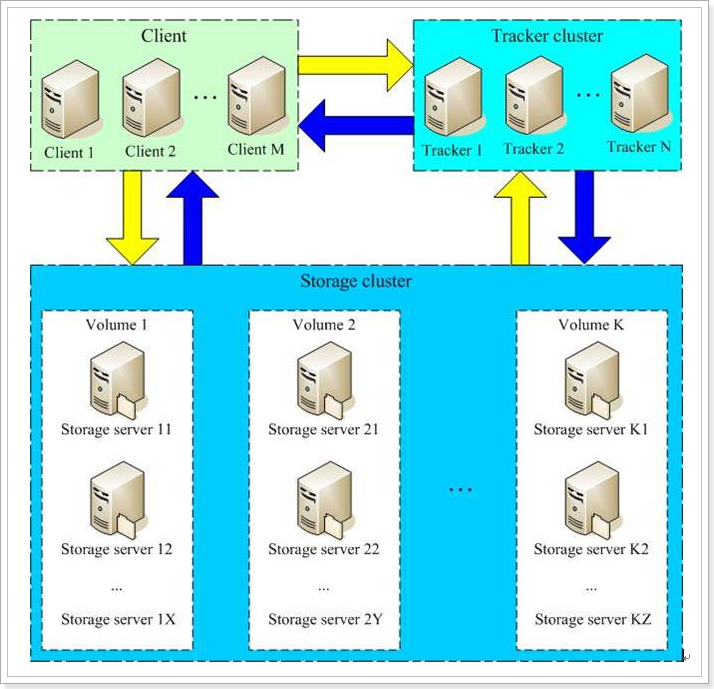
FastDFS两个主要的角色:Tracker Server 和 Storage Server 。
- Tracker Server:跟踪服务器,主要负责调度storage节点与client通信,在访问上起负载均衡的作用,和记录storage节点的运行状态,是连接client和storage节点的枢纽。
- Storage Server:存储服务器,保存文件和文件的meta data(元数据),每个storage server会启动一个单独的线程主动向Tracker cluster中每个tracker server报告其状态信息,包括磁盘使用情况,文件同步情况及文件上传下载次数统计等信息
- Group:文件组,多台Storage Server的集群。上传一个文件到同组内的一台机器上后,FastDFS会将该文件即时同步到同组内的其它所有机器上,起到备份的作用。不同组的服务器,保存的数据不同,而且相互独立,不进行通信。
- Tracker Cluster:跟踪服务器的集群,有一组Tracker Server(跟踪服务器)组成。
- Storage Cluster :存储集群,有多个Group组成。
3.2 java客户端
3.2.1 引入依赖
在父工程中,我们已经管理了依赖,版本为:
1
| <fastDFS.client.version>1.26.2</fastDFS.client.version>
|
因此,这里我们直接引入坐标即可:
1
2
3
4
| <dependency>
<groupId>com.github.tobato</groupId>
<artifactId>fastdfs-client</artifactId>
</dependency>
|
3.2.2 引入配置类
纯java配置:
1
2
3
4
5
6
| @Configuration
@Import(FdfsClientConfig.class)
@EnableMBeanExport(registration = RegistrationPolicy.IGNORE_EXISTING)
public class FastClientImporter {
}
|
3.2.3 编写FastDFS属性
1
2
3
4
5
6
7
8
| fdfs:
so-timeout: 1501
connect-timeout: 601
thumb-image:
width: 60
height: 60
tracker-list:
- 192.168.56.101:22122
|
3.2.4 测试
1
2
3
4
5
6
7
8
9
10
11
12
13
14
15
16
17
18
19
20
21
22
23
24
25
26
27
28
29
30
31
32
33
34
35
36
37
| @RunWith(SpringRunner.class)
@SpringBootTest(classes = LyUploadService.class)
public class FdfsTest {
@Autowired
private FastFileStorageClient storageClient;
@Autowired
private ThumbImageConfig thumbImageConfig;
@Test
public void testUpload() throws FileNotFoundException {
File file = new File("D:\\test\\baby.png");
StorePath storePath = this.storageClient.uploadFile(
new FileInputStream(file), file.length(), "png", null);
System.out.println(storePath.getFullPath());
System.out.println(storePath.getPath());
}
@Test
public void testUploadAndCreateThumb() throws FileNotFoundException {
File file = new File("D:\\test\\baby.png");
StorePath storePath = this.storageClient.uploadImageAndCrtThumbImage(
new FileInputStream(file), file.length(), "png", null);
System.out.println(storePath.getFullPath());
System.out.println(storePath.getPath());
String path = thumbImageConfig.getThumbImagePath(storePath.getPath());
System.out.println(path);
}
}
|
结果:
1
2
3
| group1/M00/00/00/wKg4ZVro5eCAZEMVABfYcN8vzII630.png
M00/00/00/wKg4ZVro5eCAZEMVABfYcN8vzII630.png
M00/00/00/wKg4ZVro5eCAZEMVABfYcN8vzII630_60x60.png
|